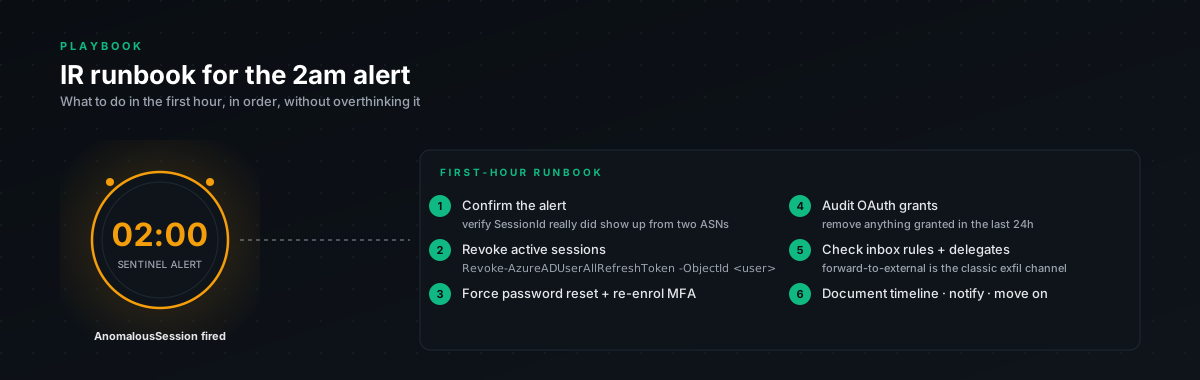
You got the alert. Now what?
The alert fires. Could be the session-replay detection. Could be the hosting-ASN one. Could be the chained persistence one (in which case it's almost certainly real).
The instinct is to investigate first, then act. Resist that instinct. Investigation is fine, but revoke the session before you investigate, because every minute the session stays valid is a minute the attacker is doing damage. Investigation can wait. Containment can't.
This runbook is what we run, in order, when an AiTM detection fires for a real account.
Phase 1. Containment (first 5 minutes)
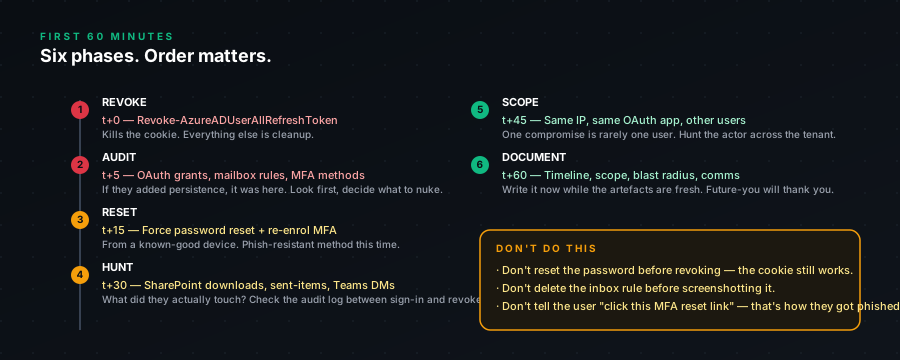
Goal: stop the bleeding. Cut the attacker off from any session they currently have.
1.1. Revoke all sessions for the user
Connect-MgGraph -Scopes "User.Read.All", "Directory.AccessAsUser.All", "AuditLog.Read.All", "User.RevokeSessions.All"chr(10)chr(10)# Replace with the affected UPNchr(10)$upn = "victim@yourdomain.com"chr(10)chr(10)Revoke-MgUserSignInSession -UserId $upnThis invalidates all current refresh tokens. The attacker's stolen cookies stop working immediately. Any active session they have running (Outlook web, Teams, etc.) gets disconnected within seconds via Continuous Access Evaluation if you have it enabled, otherwise on the next token refresh (max 1 hour).
1.2. Disable the account temporarily
Update-MgUser -UserId $upn -AccountEnabled:$falseThis is the belt-and-braces. Even if the session revocation hits some race condition, a disabled account can't authenticate at all. You'll re-enable it after Phase 2.
1.3. Note the time
You'll want this for the timeline. Containment time = T0. Everything else gets measured against this.
$T0 = Get-Datechr(10)Write-Host "Containment achieved at: $T0"Phase 2. Diagnosis (next 30 minutes)
Goal: figure out exactly what the attacker did with the session before you cut them off.
2.1. Pull all sign-ins for this user, last 24h
Get-MgAuditLogSignIn -Filter "userPrincipalName eq '$upn' and createdDateTime ge $((Get-Date).AddHours(-24).ToString('yyyy-MM-ddTHH:mm:ssZ'))" -Top 100 |chr(10)Select-Object CreatedDateTime, IpAddress, ClientAppUsed, AppDisplayName, ConditionalAccessStatus, ResultType, RiskLevelDuringSignIn |chr(10)Format-Table -AutoSizeLook for:
- IPs you don't recognize (especially hosting ASNs)
- User agents that don't match the user's known devices
- Apps the user doesn't normally use
- Risk-level "medium" or "high" entries
- ResultType = 0 (success) from suspicious sources
2.2. Pull mailbox audit log
# Use the older Search-UnifiedAuditLog because it gives you the richest datachr(10)Search-UnifiedAuditLog -StartDate (Get-Date).AddHours(-24) -EndDate (Get-Date) -UserIds $upn -Operations MailItemsAccessed,Send,New-InboxRule,Set-InboxRule -ResultSize 5000 |chr(10)Select-Object CreationDate, UserIds, Operations, ClientIP, AuditData |chr(10)Format-Table -AutoSizeCritical things to look for:
- MailItemsAccessed, the attacker reading mail. Note which folders, which messages.
- Send, outbound emails the attacker sent. Especially to known contacts of the victim.
- New-InboxRule / Set-InboxRule, forwarding rules the attacker created.
2.3. Check for new OAuth grants
Get-MgUserOAuth2PermissionGrant -UserId $upn |chr(10)Where-Object { $_.StartTime -gt (Get-Date).AddHours(-24) } |chr(10)Select-Object ClientId, Scope, StartTimeAnything granted in the last 24h that you don't recognize → attacker persistence.
2.4. Check for new MFA methods
Get-MgUserAuthenticationMethod -UserId $upn |chr(10)Select-Object Id, AdditionalPropertiesCross-reference timestamps with the user's known method registration. Anything new in the last 24h that the user didn't register themselves → attacker persistence.
2.5. Check for new device registrations
Get-MgUserOwnedDevice -UserId $upn |chr(10)Select-Object Id, DisplayName, RegistrationDateTime |chr(10)Where-Object { $_.RegistrationDateTime -gt (Get-Date).AddHours(-24) }Phase 3. Eradication (next 30 minutes)
Goal: remove every trace of attacker persistence. Things planted that survive password reset.
3.1. Remove malicious mailbox rules
For each suspicious rule found in Phase 2.2:
Get-InboxRule -Mailbox $upn |chr(10)Where-Object { $_.Enabled -eq $true } |chr(10)Format-Table -AutoSize Identity, Name, ForwardTo, ForwardingSmtpAddress, RedirectTo, DeleteMessagechr(10)chr(10)# Then for the bad ones:chr(10)Remove-InboxRule -Mailbox $upn -Identity "<rule-name-or-id>" -ForceCheck both inbox rules (Get-InboxRule) and transport rules (Get-TransportRule), attackers use both depending on tooling.
3.2. Revoke malicious OAuth grants
For each suspicious grant from Phase 2.3:
Remove-MgUserOAuth2PermissionGrant -OAuth2PermissionGrantId "<grant-id>"chr(10)chr(10)# Also check app role assignments:chr(10)Get-MgUserAppRoleAssignment -UserId $upn |chr(10)Where-Object { $_.CreatedDateTime -gt (Get-Date).AddHours(-24) }chr(10)# Remove with:chr(10)Remove-MgUserAppRoleAssignment -UserId $upn -AppRoleAssignmentId "<assignment-id>"3.3. Remove suspicious MFA methods
For each method registered in last 24h that the user didn't register:
# Phone methodschr(10)Remove-MgUserAuthenticationPhoneMethod -UserId $upn -PhoneAuthenticationMethodId "<method-id>"chr(10)# Email methodschr(10)Remove-MgUserAuthenticationEmailMethod -UserId $upn -EmailAuthenticationMethodId "<method-id>"chr(10)# Authenticator app methodschr(10)Remove-MgUserAuthenticationMicrosoftAuthenticatorMethod -UserId $upn -MicrosoftAuthenticatorAuthenticationMethodId "<method-id>"3.4. Remove suspicious devices
Remove-MgDevice -DeviceId "<device-id>"3.5. Reset password
Now (not before) reset the password. If you reset before clearing persistence, the attacker still has forwarding rules and OAuth grants, and they may have already registered their MFA, which means they can use the password reset flow against you.
Update-MgUser -UserId $upn -PasswordProfile @{chr(10)Password = "<random-strong-password>"chr(10)ForceChangePasswordNextSignIn = $truechr(10)}Communicate the temporary password to the user via phone (not email, email might still be forwarded if you missed a rule).
3.6. Re-enable the account
Update-MgUser -UserId $upn -AccountEnabled:$truePhase 4. Pivot hunt (parallel with Phase 3)
Goal: find adjacent compromise. Other users hit by the same campaign.
4.1. Hunt for the source IP across your tenant
let suspect_ip = "<the source IP from the alert>";chr(10)SigninLogschr(10)| where TimeGenerated > ago(7d)chr(10)| where IPAddress == suspect_ipchr(10)| where ResultType == 0chr(10)| project TimeGenerated, UserPrincipalName, IPAddress, AppDisplayName, UserAgent, ResultTypechr(10)| order by TimeGenerated descIf multiple users have signed in from this IP, you're looking at a campaign. Repeat the full runbook for every affected user.
4.2. Hunt for the same UA pattern
let suspect_ua = "<the user agent from the alert>";chr(10)SigninLogschr(10)| where TimeGenerated > ago(7d)chr(10)| where UserAgent == suspect_uachr(10)| where ResultType == 0chr(10)| where AutonomousSystemNumber in (16509, 14618, 14061, 24940, 16276, 63949, 20473) // hosting ASNschr(10)| summarize count() by UserPrincipalName, IPAddresschr(10)| order by count_ desc4.3. Hunt for the same forwarding-rule pattern
If the attacker forwarded to a specific external address:
let suspect_address = "leak0314@protonmail.com";chr(10)OfficeActivitychr(10)| where TimeGenerated > ago(30d)chr(10)| where Operation in ("New-InboxRule", "Set-InboxRule")chr(10)| where Parameters has suspect_addresschr(10)| project TimeGenerated, UserId, ParametersForwarding addresses are often reused across a campaign.
Phase 5. Recovery (next 24h)
5.1. Notify the user
Phone call, not email. Walk them through:
- What happened
- What you've done
- Why their email is now gone for 5 minutes while you finish (they'll see disconnections)
- New password
- Need to re-register their authenticator app
5.2. Notify legal / privacy / compliance as applicable
If the attacker accessed mail that contains regulated data (PHI, PII, financial records), depending on your jurisdiction you may have notification obligations within 72 hours.
5.3. Audit lateral compromise
For every email the attacker sent from this account in the last 24h, check whether the recipient acted on it. BEC pivots are the most common follow-on, wire instruction changes, vendor invoice swaps, payroll redirects. Notify recipients of suspicious emails out-of-band.
5.4. Update detections
Take whatever you learned during this incident and update the detections. New ASN you didn't have? Add it. New persistence pattern? Write a rule for it. The attacker's TTPs are now known to you, don't waste them.
Phase 6. Post-incident (next week)
6.1. Document the timeline
T0 (containment) → T1 (full eradication) → T2 (notification) → T3 (recovery complete). This becomes the post-mortem and feeds future tabletop exercises.
6.2. Review prevention
Did the attack succeed because the user wasn't on phishing-resistant MFA? Push to enroll them. Did the persistence get planted because Token Protection wasn't enforced? Push that timeline forward. The incident is the political capital you need to accelerate prevention work.
6.3. Update training
The user who got phished isn't to blame. The system is. But it's worth a non-blaming conversation with them: walk them through what they saw, what was different, and how to recognize it next time. Especially: explain why they should never be ABLE to fail by typing creds, after FIDO2 rolls out, the failure mode going forward should be "the page just doesn't work," not "I typed my password into the wrong site."
A note on tooling
This runbook is PowerShell + Graph + KQL because that's what's universally available in M365 environments. If you have higher-tier tooling (Defender XDR, Sentinel SOAR, Logic Apps), wire as much of Phase 1 as possible to fire automatically when a CRITICAL detection lands. The session revoke + account disable can run in under 10 seconds without human triage. Cuts your dwell time by 90%.
The investigation phase (Phase 2) is harder to automate well, too much judgment involved. Phase 3 (eradication) can be partially automated for known patterns. Phase 4 (hunt) should be a pre-built saved query that runs with one click.
The exact PowerShell sequences in this runbook are tested in our lab. If you spot a Graph API change that's broken any of them, let us know, the API has been moving and we update this runbook quarterly.