Why hosting ASNs are such a strong signal
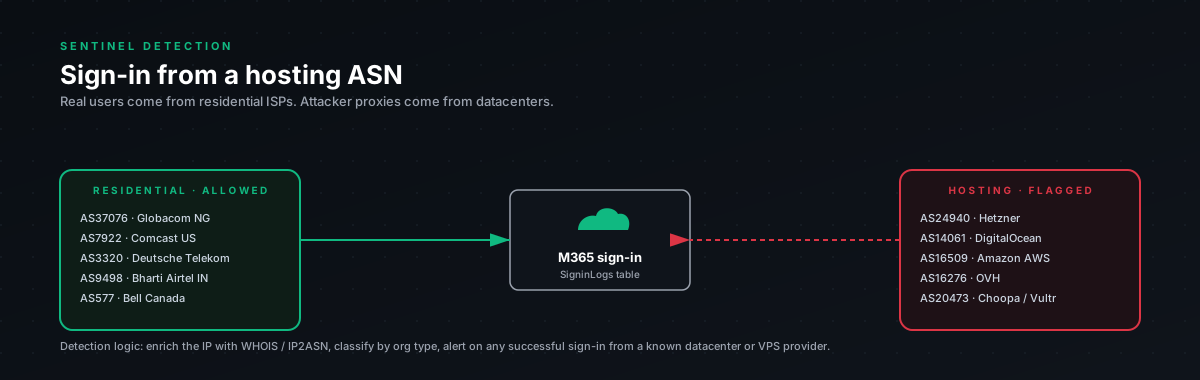
Real users don't browse from datacenters. They browse from Comcast, BT, Vodafone, Orange, Spectrum, T-Mobile. Their IPs map to residential broadband ASNs or mobile carrier ASNs.
Attackers who've stolen cookies replay them from rented VPS infrastructure. DigitalOcean. Hetzner. OVH. Linode. AWS or Azure when they want to look more legitimate. Their IPs map to hosting ASNs.
This isn't a probability, it's a tell. When someone signs into M365 as a user account from a hosting ASN, one of two things is true:
- Compromise. Cookie replay or password-spray-with-stolen-creds.
- Policy violation. The user is using a cloud-hosted personal VPN service routed through hosting infrastructure (NordVPN, Mullvad, ProtonVPN). Some of these route through hosting ASNs.
Both deserve investigation. The first is obvious. The second is "your user is intentionally hiding their location from your sign-in logs," which is its own conversation with HR/security.
The query
let lookback = 24h;chr(10)let hosting_asns = dynamic([chr(10)16509, 14618, // AWSchr(10)8075, 396982, // Microsoft Azure (filter further if you also use Azure!)chr(10)15169, // Google Cloudchr(10)14061, // DigitalOceanchr(10)24940, // Hetznerchr(10)16276, // OVHchr(10)63949, // Linode / Akamaichr(10)20473, // Choopa / Vultrchr(10)6939, // Hurricane Electricchr(10)30633, // Leasewebchr(10)13335, // Cloudflare (other tenants probing, rare from real users)chr(10)36352, // ColoCrossingchr(10)53667, // FranTech / BuyVMchr(10)136258 // Various budget VPSchr(10)]);chr(10)let known_legit_asns = dynamic([chr(10)// If your org legitimately routes through any of these (corporate VPN to cloud, etc.)chr(10)// add them here. Empty by default.chr(10)]);chr(10)let privileged_roles = dynamic([chr(10)"Global Administrator",chr(10)"Privileged Role Administrator",chr(10)"Privileged Authentication Administrator",chr(10)"Conditional Access Administrator",chr(10)"Security Administrator",chr(10)"Application Administrator",chr(10)"Cloud Application Administrator",chr(10)"Exchange Administrator",chr(10)"SharePoint Administrator",chr(10)"User Administrator"chr(10)]);chr(10)SigninLogschr(10)| where TimeGenerated > ago(lookback)chr(10)| where ResultType == 0chr(10)| where isnotempty(IPAddress)chr(10)| where AutonomousSystemNumber in (hosting_asns)chr(10)| where AutonomousSystemNumber !in (known_legit_asns)chr(10)// Service principal sign-ins legitimately come from cloud, exclude themchr(10)| where ResourceServicePrincipalId == "" or isempty(ResourceServicePrincipalId)chr(10)| extend Country = tostring(LocationDetails.countryOrRegion)chr(10)| extend City = tostring(LocationDetails.city)chr(10)| extend RiskState = tostring(RiskState)chr(10)| extend RiskLevel = tostring(RiskLevelDuringSignIn)chr(10)| join kind=leftouter (chr(10)IdentityInfochr(10)| where TimeGenerated > ago(7d)chr(10)| summarize arg_max(TimeGenerated, *) by AccountUPNchr(10)| project AccountUPN, AssignedRoleschr(10)) on $left.UserPrincipalName == $right.AccountUPNchr(10)| extend IsPrivileged = iff(AssignedRoles has_any (privileged_roles), "YES", "no")chr(10)| project TimeGenerated, UserPrincipalName, IsPrivileged, AssignedRoles,chr(10)IPAddress, AutonomousSystemNumber, Country, City,chr(10)UserAgent, AppDisplayName, ClientAppUsed,chr(10)RiskState, RiskLevel, ResultTypechr(10)| order by IsPrivileged desc, TimeGenerated descWhat's in the ASN list, and why it matters
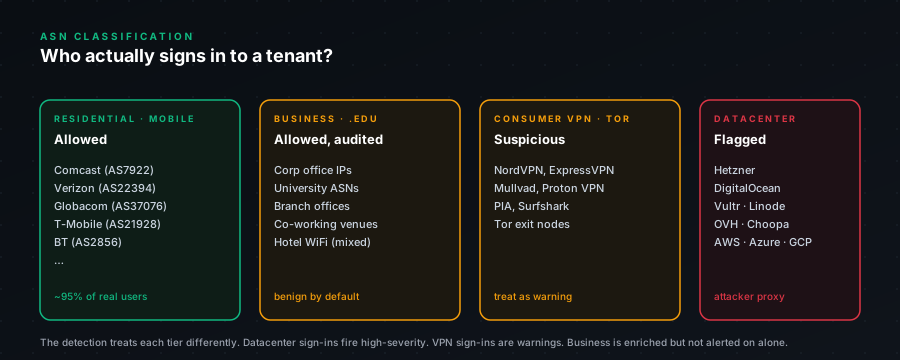
The ASN list isn't comprehensive, it's the providers we keep seeing in real AiTM campaigns. Five rules of thumb when extending it:
Major cloud (AWS, Azure, GCP): include them, but be aware that legitimate enterprise traffic sometimes routes through here. Specifically: if your org has any cloud-hosted apps that authenticate users via Azure AD passthrough or B2C, those backend service-principal sign-ins legitimately originate from cloud ASNs. The ResourceServicePrincipalId filter handles that, only flag user account sign-ins.
Budget VPS (Hetzner, OVH, Linode, Vultr, DigitalOcean): include them all. We've never seen a legitimate end-user sign in from any of these.
Hosting/colo (LeaseWeb, ColoCrossing, FranTech): include. Same as above.
Cloudflare (13335): controversial. Cloudflare runs Workers and various other services that occasionally hit Microsoft endpoints. The legitimate volume is very low. Include but expect some noise.
Tor exits: separate detection, higher severity. Don't lump in. There's a public Tor exit list you can pull and use for a dedicated rule.
False positives, be honest about them
The list isn't zero, even though hosting ASN is a strong signal:
Personal VPN users. NordVPN, Mullvad, ProtonVPN, etc., some of these use hosting providers as part of their infrastructure. The user is hiding their location. From your security tooling's perspective, this looks identical to AiTM cookie replay. The mitigation is policy: make personal VPN use against AUP for M365 access, then this becomes "just block them."
Devs working from cloud workspaces. Some companies have engineers SSH'ing into AWS-hosted dev instances and then doing M365 stuff from inside that instance. Rare in 2026 but happens. Add their IPs to known_legit_asns.
Mobile carrier APNs that route through cloud. Saw this once with a regional carrier in Africa whose APN routed through OVH. One-off. Just add to allowlist.
Microsoft's own tenants doing CASB inspection. When MCAS routes through a session, the IP looks Microsoft. The service-principal filter handles this for most cases.
The pattern that's almost never a false positive: hosting ASN + privileged role. We've seen this exactly zero times in legitimate use. If you see this, treat as confirmed compromise.
Severity tiers we use
- CRITICAL. Hosting ASN sign-in by Global Admin, Privileged Role Admin, Security Admin, Application Admin. Page on-call immediately.
- HIGH. Hosting ASN sign-in by any privileged role. Investigate within 30 minutes.
- MEDIUM. Hosting ASN sign-in by standard user. Verify with user, revoke if unconfirmed.
- LOW. Hosting ASN sign-in by standard user, IP is in
known_legit_asns. Logged but no alert.
The criticality tier is what makes this detection useful. Without it, you'd page on every NordVPN user and your SOC would tune the rule out within a week.
Recommended response
For privileged accounts (CRITICAL/HIGH):
- Revoke immediately. Don't wait. Use
Revoke-MgUserSignInSession. - Reset password.
- Reset any MFA method registered in the last 24h.
- Audit all activity in the last 24h: forwarding rules, OAuth grants, mailbox reads, device registrations, MFA changes.
- Pivot-hunt: search for any other user who signed in from this same source IP in the last 7 days. Often catches adjacent compromise.
For standard users (MEDIUM):
- Verify with user out-of-band, phone call, not email. ("Did you just sign into Outlook from a server somewhere?")
- If they say no: revoke session, reset password, check their mailbox.
- If they say "yes I'm using my VPN": still revoke and have a conversation about AUP, log the IP to
known_legit_asnsif you decide it's an exception. - Audit their mailbox activity for the last 24h regardless. Better to over-check than under-check.
Pivot hunt query
When this detection fires, run this to find adjacent compromise:
let suspect_ip = "<the source IP from the alert>";chr(10)SigninLogschr(10)| where TimeGenerated > ago(7d)chr(10)| where IPAddress == suspect_ipchr(10)| where ResultType == 0chr(10)| project TimeGenerated, UserPrincipalName, IPAddress, AppDisplayName, UserAgent, ResultTypechr(10)| order by TimeGenerated descIf multiple users have signed in from this IP, you're looking at a campaign, not a one-off. Adjust scope accordingly.