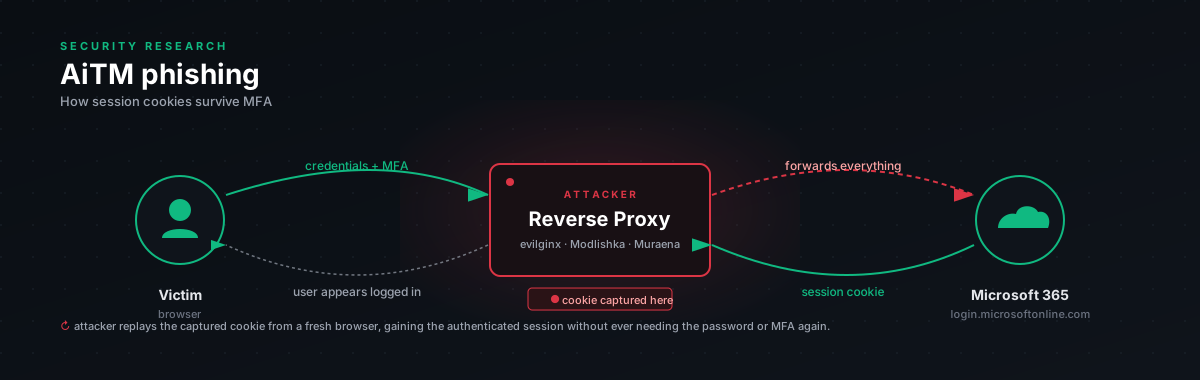
The whole attack in one paragraph
Attacker stands up a proxy that looks like the Microsoft login page. Sends the victim a link. Victim clicks. The proxy displays login.microsoftonline.com, but the victim is really talking to the proxy, and the proxy is talking to the real Microsoft. Victim types email, password, approves MFA on their phone. MFA succeeds at Microsoft. Microsoft sends back the auth cookie (ESTSAUTH and friends). The proxy reads it on the way through, sends it to the attacker via Telegram, and forwards the victim onward to the real Office 365 like nothing happened. The attacker pastes the cookie into their browser. They are now logged in as the victim. No MFA prompt. The session cookie is enough.
That's it. That's the whole attack.
The thing people miss is that it doesn't beat MFA, it lets MFA succeed, then steals the proof. By the time you're triaging the alert, the attacker has had a valid session for somewhere between five minutes and two hours, depending on how fast your detections route.
Why this is so common
Three things made AiTM go from a niche technique to a default playbook around 2022:
The toolchain is open source. Anyone willing to spend an afternoon can stand up an evilginx fork on a $5 VPS. The phishlet definitions for Microsoft 365 are public.
The yield is huge. Cookies from a finance team lead are immediately monetisable. BEC pivots, vendor invoice swaps, payroll redirection, the playbook from initial cookie capture to wire fraud is well-rehearsed.
Defenders aren't ready. Most M365 tenants in 2026 still rely on push-notification MFA, which the attack doesn't break. The user approves the push because, from their perspective, they really are logging in. It feels normal.
Mapped to ATT&CK
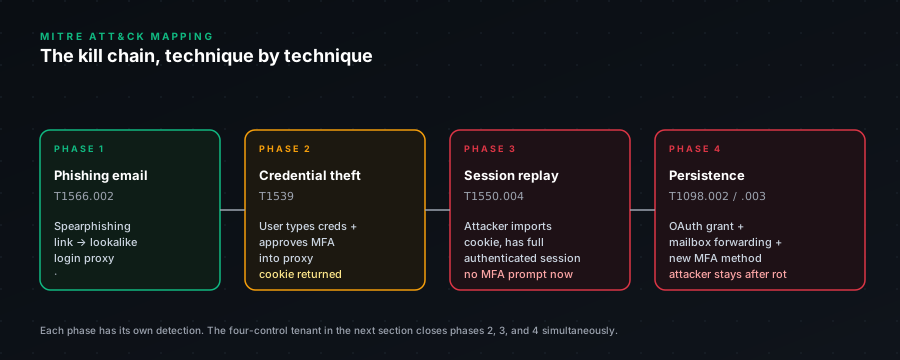
| Step | Technique | What's happening | |---|---|---| | Initial access | T1566.002 | Email with link to phishing domain | | Resource development | T1583.001 | Attacker registers domain, often Cloudflare-fronted | | Credential capture | T1056.003 | Email + password caught in transit | | Cookie theft | T1539 | ESTSAUTH, ESTSAUTHPERSISTENT, SignInStateCookie lifted from response | | Cloud account access | T1078.004 | Cookies replayed from attacker machine | | Persistence | T1098.002 | Mailbox forwarding rule planted | | Persistence | T1098.003 | OAuth app consent grant | | Collection | T1114.002 | Mailbox scrape via Graph API | | Lateral movement | T1534 | Internal phish from compromised account | | Impact | T1657 | BEC, wire fraud, payroll diversion |
The persistence layer is the part that hurts. Once a forwarding rule or OAuth grant is in place, password reset alone doesn't fix it. We've seen tenants that "remediated" by resetting passwords still leak email weeks later because nobody removed the forwarding rule.
What breaks each step
The right way to think about defense is: which control kills which step? Some controls are strong but only block one stage. Phishing-resistant MFA and Token Protection are the two that take entire stages off the board.
| Step | What breaks it | How strong | |---|---|---| | Email reaches inbox | Defender for Office 365 Safe Links + sandbox detonation | Useful but bypassed by Cloudflare-fronted phishing domains | | Phishing page reaches victim | Browser Safe Browsing / SmartScreen | Useful but reputation lags by hours, sometimes days | | Credentials typed | Phishing-resistant MFA (FIDO2 / passkey) | Strong. WebAuthn is bound to the origin. The proxy is at a different origin. The authenticator refuses to sign. | | MFA approved | User awareness, number matching, location prompts | Some help. Humans approve under pressure. | | Cookies captured | Token Protection (TP) | Strong. Token bound to the original device's TPM. Replayed cookie fails the binding check. | | Cookies replayed | Compliant device required | Strong. Attacker's machine isn't enrolled. CA fails at resource access. | | Cookies replayed | Continuous Access Evaluation | Useful. Revokes session on risk signal in seconds, not hours. | | Persistence established | Mailbox audit + OAuth grant alerting | Detection-only. Doesn't prevent. Catches it after. |
If you take one thing from this table, take this: phishing-resistant MFA on the user side, plus Token Protection on the token side, makes AiTM economically unviable against your tenant. The attacker can run their phishing campaign all day and capture all the cookies. The cookies are useless.
The four-control AiTM-resistant tenant
A tenant with all of these in place can't really be hit by this attack class:
- Phishing-resistant MFA for everyone. FIDO2, passkeys, Windows Hello for Business. The reason this works isn't magic. WebAuthn binds the cryptographic challenge to the origin (
login.microsoftonline.com). The proxy is atcdn-reviewdocument.example.com. The authenticator looks at the origin, sees a mismatch, and refuses to sign. The user can't even fail at this, the auth flow just doesn't complete. - Token Protection via Conditional Access. Microsoft's name for binding tokens to the device that received them. Issued tokens contain a TPM-signed proof. Replay from a different machine fails signature validation. Coverage is still partial as of 2026 (strong on Windows 11, weaker on macOS, narrowing on mobile) but it's matured a lot since the 2023 preview.
- Compliant device or Hybrid Azure AD Joined for sensitive resources. Catches the attacker at the second stage, they may have the cookie, but accessing Exchange / SharePoint / your finance app fails the compliance check because their machine isn't enrolled in your Intune.
- Continuous Access Evaluation. Risk signals (impossible travel, anomalous IP) revoke sessions in seconds. The default token lifetime is an hour. CAE narrows that to almost-real-time when something looks off.
You don't need all four to be safe. You need at least one. Two layered is comfortable. All four is the gold standard.
What signals the attack leaves
Even when you can't prevent it, the attack is noisy if you know where to look. The detections in this bundle look for these signals:
Mid-attack:
- Same session correlation ID, two different IPs, two different user agents, within minutes
- Sign-in to Office app from a hosting ASN. DigitalOcean, Hetzner, OVH, Linode, AWS, Azure
- User-Agent mismatch, victim was on Chrome/Windows, suddenly the session is Firefox/Linux or
python-requests - Token issued with no MFA claim, despite policy requiring MFA. The replay path doesn't trigger MFA at all.
Post-compromise:
- New mailbox forwarding rule, especially to an external address, within an hour of suspicious sign-in. Classic AiTM follow-up.
- New OAuth application consent grant from the affected user. Long-lived API access, survives password reset.
- Mass mailbox read events. Attacker scraping the inbox.
- Outbound email to known contacts of the victim. BEC pivot starting.
The second category is the gold. Forwarding rule + suspicious sign-in within 60 minutes is one of the highest-fidelity detections you can write, almost no legitimate user does that combination of actions.
Why detection alone isn't enough
Here's the brutal arithmetic. Your detection fires. It routes through your alerting system. Someone in the SOC picks it up. They triage. They confirm. They reach for the runbook. They revoke the session.
If you're a well-run org, that whole chain takes maybe 15 minutes during business hours. If it's 2am and the on-call is asleep, it's an hour, sometimes more. By minute 40, the attacker has:
- Read every email in the inbox
- Set up the forwarding rule (this survives your password reset)
- Granted themselves an OAuth app (this also survives your password reset)
- Sent two BEC emails to the victim's accounts payable contact
- Maybe registered a new MFA method so they can come back in even after you reset
This is why prevention matters more than detection. Detections are insurance. Mitigations are the actual defense. If you have the budget and political capital for one initiative, spend it on rolling out FIDO2, not on tuning Sentinel queries.
That said, when prevention fails (and it will, for the tail of users on devices that don't support TP, or the contractor who never enrolled in Intune) you want detections firing. The three KQL queries in this bundle are what we run.
Threat actors using this
Public reporting on AiTM since 2022:
- Storm-1167 (Microsoft tracking name), large-scale AiTM phishing infrastructure. Microsoft reported observing it in 10,000+ tenants in 2022 alone.
- DEV-0537 / Lapsus$, used AiTM for initial access in several high-profile breaches.
- Numerous BEC actor groups, too many to track individually. AiTM is the default initial-access technique for BEC against M365 in 2026.
Microsoft published their own AiTM research in mid-2022 and has been adding mitigations since: Token Protection (2023), authentication strength policies, continued CAE improvements. The mitigations in this bundle align with Microsoft's published guidance, with our own opinions on rollout order layered on top.
Up next in this bundle
- Three KQL detections, session replay, hosting-ASN sign-in, and the chained "suspicious sign-in followed by persistence action" detection that's the highest-fidelity of the three.
- The Conditional Access policies that break AiTM, with rollout sequence and break-glass guidance so you don't lock yourself out.
- An IR playbook for when one of the detections fires.
Read the threat model first. Pick the layer you're weakest at. Start there.