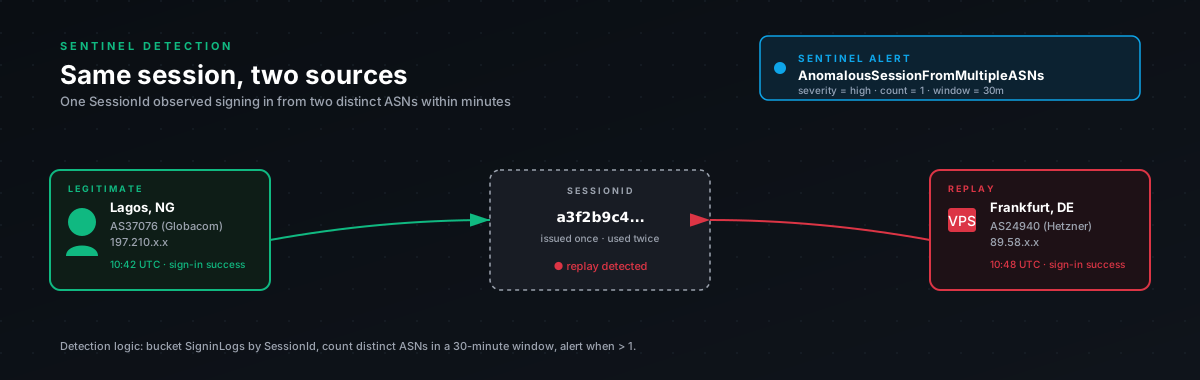
What this detection catches
When the attacker replays a stolen cookie from their own machine, the cookie's session correlation appears in SigninLogs from a different IP and a different user agent than the original victim. Same CorrelationId. Different IPAddress. Different UserAgent. Often within minutes of each other.
That pattern is the signature of session replay. It's not the only thing that produces it (we'll get to false positives) but when you see it for a privileged user, it's almost always a real incident.
The query
let lookback = 24h;chr(10)let known_corp_egress = dynamic([chr(10)// Drop your VPN exits, office gateways, and any other shared egress IPs here.chr(10)// Otherwise people transitioning between WiFi and VPN will trigger this.chr(10)// "203.0.113.10", "203.0.113.11"chr(10)]);chr(10)SigninLogschr(10)| where TimeGenerated > ago(lookback)chr(10)| where ResultType == 0 // successful sign-ins onlychr(10)| where IPAddress !in (known_corp_egress)chr(10)| project TimeGenerated, UserPrincipalName, IPAddress, UserAgent,chr(10)AppDisplayName, CorrelationId, DeviceDetail, Locationchr(10)| summarizechr(10)DistinctIPs = dcount(IPAddress),chr(10)DistinctUAs = dcount(UserAgent),chr(10)IPList = make_set(IPAddress, 10),chr(10)UAList = make_set(UserAgent, 10),chr(10)AppList = make_set(AppDisplayName, 10),chr(10)FirstSeen = min(TimeGenerated),chr(10)LastSeen = max(TimeGenerated),chr(10)SignInCount = count()chr(10)by UserPrincipalName, CorrelationIdchr(10)| where DistinctIPs > 1 or DistinctUAs > 1chr(10)| where datetime_diff('minute', LastSeen, FirstSeen) <= 60chr(10)| extend MinutesBetween = datetime_diff('minute', LastSeen, FirstSeen)chr(10)| project UserPrincipalName, CorrelationId, FirstSeen, LastSeen, MinutesBetween,chr(10)DistinctIPs, DistinctUAs, IPList, UAList, AppList, SignInCountchr(10)| order by LastSeen descWhy CorrelationId, not SessionId
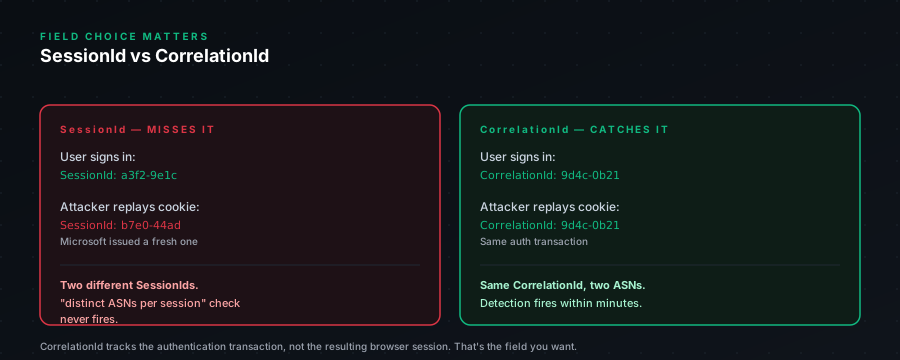
Azure AD doesn't expose a literal "session cookie ID" in SigninLogs. CorrelationId is the next-best thing, it tracks the auth session across the related sign-in events. It's not perfect (some auth flows reuse it across closely-related apps in ways that look weird), but for AiTM detection it's the closest signal we have without joining AADTokenIssuance, which only some tenants have.
If you have AADTokenIssuance available (Sentinel data connector), you can sharpen this detection by joining on SessionId from there. We'll publish that variant as a follow-up. For most tenants, CorrelationId-based works.
False positives we keep hitting
Honest list, because nothing kills a SOC's trust faster than a noisy detection:
Mobile users on cellular ↔ wifi switching. Same session, IP changes when they walk into the office. The 60-minute window mitigates this somewhat (the IP change usually happens once and then settles) but if the user is on a train switching towers, you'll see multiple IPs in a short window. We exclude users with JobTitle containing "Sales" / "Field" via a separate watchlist before flagging.
VPN connect/disconnect. Same session, IP changes when the user enables their corporate VPN. This is what known_corp_egress is for. Populate it. It's tedious but it's the difference between a useful detection and an alert-fatigue generator.
Modern auth flows reusing CorrelationId. Some app combinations (specifically Outlook desktop opening Teams as a sub-app) produce two distinct sign-ins with the same CorrelationId, slightly different UAs. We watch for this pattern in the AppList and have an exclusion: if both AppDisplayName values are Microsoft first-party and the IPs are in the same /24, we drop the alert.
Macbook waking up on different network. Catches some users. Same CorrelationId after a sleep/wake, different IP. Usually settles after a few minutes.
The pattern that's almost never a false positive: same CorrelationId, two IPs, one of them is in a hosting ASN (DigitalOcean, AWS, Hetzner). When that happens, treat as confirmed compromise until proven otherwise. The hosting-ASN detection in this bundle catches that case directly, but if both fire on the same user, your confidence is very high.
Recommended tuning
We run this detection at MEDIUM severity by default, and we add a rule that escalates to HIGH if any of the following are true:
- One of the IPs is in a hosting ASN (cross-reference with the hosting-ASN detection)
- The user has a privileged role (Global Admin, Security Admin, Exchange Admin, etc.)
- A new mailbox forwarding rule was created within 2h of LastSeen (cross-reference with the persistence detection)
- The MinutesBetween is under 5 (rapid sequential sign-in is more suspicious than gradual)
The chain "session-replay → hosting-ASN → persistence action" is what we call the gold trio. When all three fire on the same user in the same hour, the answer is "yes, they're compromised, revoke now, audit later."
Recommended response
When this fires for a non-privileged user, no escalation, no other detections firing:
- Verify with user out-of-band, phone call, not email.
- If unconfirmed legitimate, revoke their sessions:
Revoke-MgUserSignInSession -UserId <upn> - Force password reset.
- Check their mailbox audit for the last 24h. Look for unusual reads, sent items, forwarding rules.
- Move on.
When this fires for a privileged user, OR with hosting-ASN cross-fire:
- Revoke immediately, don't wait to verify.
- Reset password and any MFA methods registered in last 24h.
- Audit forwarding rules, OAuth grants, device registrations.
- Pivot-hunt on the source IP across other users.
- Escalate to IR lead.
The runbook in this bundle has the full playbook with the exact PowerShell commands.