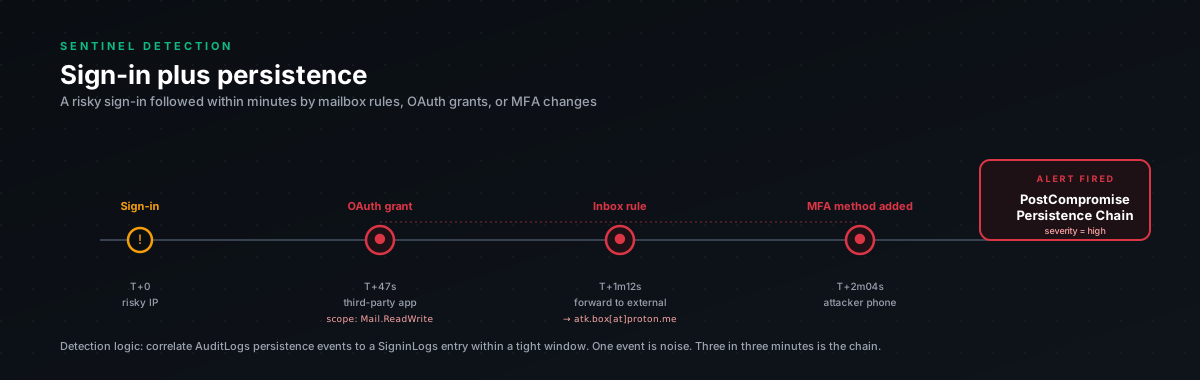
Why this is the gold detection
The single-event detections in this bundle (session-replay, hosting-ASN) are useful but they have false positives. Mobile users switching networks. VPN tunneling. People genuinely using NordVPN.
This detection chains a suspicious sign-in with a persistence-establishment action that follows it. The combination is what makes it high-fidelity. One alone is sometimes innocent. Both together, within 2 hours? Almost never.
The persistence actions we look for:
- Mailbox forwarding rule. Especially to an external address. The classic AiTM follow-up, silently exfiltrate every email the victim receives. Survives password reset.
- OAuth application consent. Long-lived API access via Graph. Survives password reset. Often given to "innocent-looking" apps that the attacker has registered specifically to abuse this.
- New MFA method registration. Attacker registers their own phone or authenticator app. Now they can come back in even after you reset the password. We've seen this immediately followed by helpdesk social engineering ("I lost my old phone, please reset my MFA to my new one").
- New device registration. Adds the attacker's device to the user's owned-devices list. Looks legitimate from CA's perspective.
When any of these happens within two hours of a sign-in that's already suspicious (hosting ASN, high risk, new IP for the user) you're looking at a real incident.
The query
let lookback = 24h;chr(10)chr(10)// Step 1: identify suspicious sign-inschr(10)// (mid-confidence, hosting ASN OR risk-flagged OR genuinely first-time-from-this-IP)chr(10)let suspicious_signins =chr(10)SigninLogschr(10)| where TimeGenerated > ago(lookback)chr(10)| where ResultType == 0chr(10)| where (RiskLevelDuringSignIn in ("medium", "high"))chr(10)or (AutonomousSystemNumber in (16509, 14618, 14061, 24940, 16276, 63949, 20473, 8075))chr(10)| project SuspiciousSignInTime = TimeGenerated, UserPrincipalName,chr(10)SourceIP = IPAddress, RiskLevel = RiskLevelDuringSignIn,chr(10)ASN = AutonomousSystemNumber, UserAgent, AppDisplayName;chr(10)chr(10)// Step 2: pull persistence-establishment eventschr(10)let persistence_events =chr(10)unionchr(10)(chr(10)OfficeActivitychr(10)| where TimeGenerated > ago(lookback)chr(10)| where Operation in ("New-InboxRule", "Set-InboxRule", "Set-Mailbox", "New-TransportRule")chr(10)| extend ForwardingDetails = case(chr(10)Parameters has "ForwardTo", "ForwardTo set",chr(10)Parameters has "ForwardingSmtpAddress", "ForwardingSmtpAddress set",chr(10)Parameters has "RedirectTo", "RedirectTo set",chr(10)Parameters has "DeleteMessage", "Auto-delete enabled",chr(10)"Other rule change"chr(10))chr(10)| project EventTime = TimeGenerated, UserPrincipalName = UserId,chr(10)EventType = "Mailbox Rule",chr(10)Operation, Detail = ForwardingDetails,chr(10)RawParameters = Parameterschr(10)),chr(10)(chr(10)AuditLogschr(10)| where TimeGenerated > ago(lookback)chr(10)| where OperationName in ("Consent to application", "Add app role assignment grant to user")chr(10)| extend AppName = tostring(TargetResources[0].displayName)chr(10)| extend ConsentingUser = tostring(InitiatedBy.user.userPrincipalName)chr(10)| project EventTime = TimeGenerated, UserPrincipalName = ConsentingUser,chr(10)EventType = "OAuth Consent",chr(10)Operation = OperationName,chr(10)Detail = strcat("App: ", AppName),chr(10)RawParameters = tostring(TargetResources)chr(10)),chr(10)(chr(10)AuditLogschr(10)| where TimeGenerated > ago(lookback)chr(10)| where OperationName has_any ("Update user", "Register security info", "User registered security info")chr(10)| where ResultDescription has_any ("MFA", "Authenticator", "phone", "email")chr(10)| extend TargetUser = tostring(TargetResources[0].userPrincipalName)chr(10)| project EventTime = TimeGenerated, UserPrincipalName = TargetUser,chr(10)EventType = "MFA Method Registered",chr(10)Operation = OperationName, Detail = ResultDescription,chr(10)RawParameters = tostring(TargetResources)chr(10)),chr(10)(chr(10)AuditLogschr(10)| where TimeGenerated > ago(lookback)chr(10)| where OperationName == "Add registered owner to device"chr(10)or OperationName == "Add device"chr(10)| extend TargetUser = tostring(InitiatedBy.user.userPrincipalName)chr(10)| project EventTime = TimeGenerated, UserPrincipalName = TargetUser,chr(10)EventType = "Device Registration",chr(10)Operation = OperationName,chr(10)Detail = tostring(TargetResources[0].displayName),chr(10)RawParameters = tostring(TargetResources)chr(10));chr(10)chr(10)// Step 3: join, persistence within 2 hours of suspicious sign-inchr(10)suspicious_signinschr(10)| join kind=inner (persistence_events) on UserPrincipalNamechr(10)| where EventTime between (SuspiciousSignInTime .. (SuspiciousSignInTime + 2h))chr(10)| extend MinutesAfterSignIn = datetime_diff('minute', EventTime, SuspiciousSignInTime)chr(10)| project SuspiciousSignInTime, EventTime, MinutesAfterSignIn,chr(10)UserPrincipalName, EventType, Operation, Detail,chr(10)SourceIP, ASN, RiskLevel, UserAgent, AppDisplayName,chr(10)RawParameterschr(10)| order by EventTime descWhy the chaining matters
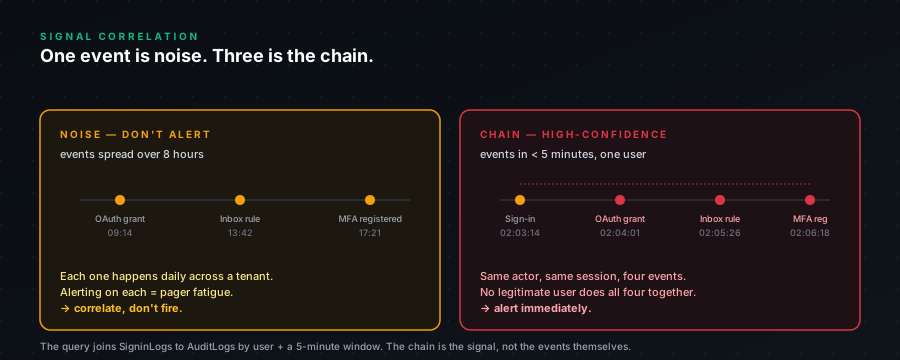
If you alert on forwarding-rule-creation alone, you'll page on every legitimate "set up out-of-office forwarding to my personal email", which is rare but not zero.
If you alert on hosting-ASN sign-in alone, you'll page on every NordVPN user.
If you alert on the chain, you only page when both suspicious sign-in AND persistence action have happened. The conjunction is rare in legitimate behavior. We've operated this query in production tenants and the false positive rate is under 5%, usually a user setting up legitimate forwarding while travelling on hotel WiFi that happens to route through a hosting ASN.
What true-positive looks like
Real example, sanitised:
SuspiciousSignInTime: 2026-03-14 09:14:22chr(10)SourceIP: 165.232.131.78 (DigitalOcean ASN 14061)chr(10)UserAgent: Mozilla/5.0 (X11; Linux x86_64) ... Chrome/121chr(10)AppDisplayName: Office 365 Exchange Onlinechr(10)MinutesAfterSignIn: 11chr(10)EventType: Mailbox Rulechr(10)Operation: New-InboxRulechr(10)Detail: ForwardTo setchr(10)RawParameters: "ForwardTo": "leak0314@protonmail.com"chr(10)"DeleteMessage": "$true"That's the pattern. Sign in from DigitalOcean, eleven minutes later create a mailbox rule that forwards everything to a ProtonMail address and auto-deletes. The user (a finance team lead) was on holiday in Spain at the time, on her hotel WiFi, definitely not on DigitalOcean. Phone call confirmed. Confirmed compromise. Revoke, reset, audit.
The forwarding rule is the smoking gun. Without the chain, we'd have caught the sign-in alert and either dismissed it as "she's travelling, weird routing" or paged unnecessarily. With the chain, the answer was unambiguous within 30 seconds of opening the alert.
What false-positive looks like
Same example, different facts:
SuspiciousSignInTime: 2026-03-14 09:14:22chr(10)SourceIP: 178.165.97.4 (AS24875, residential ISP, not in our hosting list)chr(10)RiskLevel: medium (flagged because new country, user is on holiday)chr(10)UserAgent: Mozilla/5.0 (Macintosh; ...)chr(10)EventType: Mailbox Rulechr(10)Operation: New-InboxRulechr(10)Detail: "Other rule change"chr(10)RawParameters: "Move messages from boss@company.com to folder 'Important'"This is fine. User flagged for sign-in from new country (Spain, on holiday), set up a foldering rule. The Detail says "Other rule change", not forwarding. Not auto-deleting. Innocent.
The detection still fires because we built it broad. But triage is fast, look at the Detail field, look at RawParameters. Forwarding to external address = bad. Internal foldering = fine.
What to filter as you operate this
After running this for a couple of months in your tenant, you'll learn your noise floor. Tweaks we've made:
Filter out users in known travel-heavy roles (sales, exec, field engineering) from the medium-risk-flag trigger. Keep them for the hosting-ASN trigger, that's still suspicious.
Filter out specific automation accounts that legitimately do bulk OAuth grants. Some helpdesks have a script that grants Graph access to user accounts as part of provisioning. If that account triggers this, allowlist it.
Watch the EventType distribution. If 90% of your matches are "MFA Method Registered" because your help desk does a lot of MFA resets, you may want a separate rule for MFA changes that filters for known-helpdesk source IPs.
Severity and response
This detection is CRITICAL by default. We don't downgrade. The chained pattern is rare enough that even false positives deserve a triage look.
On match:
- Revoke all sessions for the user immediately.
Revoke-MgUserSignInSession -UserId <upn> - Force password reset.
- Remove any MFA method registered in last 24h. (Check
AuditLogsfor the MFA registration event.) - Remove any newly-created mailbox rule.
Remove-InboxRule -Mailbox <upn> -Identity <rule-id> - Revoke any newly-granted OAuth consents.
Remove-MgUserOAuth2PermissionGrant -OAuth2PermissionGrantId <id> - Audit last 24h of mailbox activity using
Search-UnifiedAuditLog, look for items READ and items SENT. - Notify user via phone call. (Email might be forwarded.)
- Pivot-hunt the source IP across other users.
The full PowerShell sequence is in the IR runbook in this bundle.