What this catches
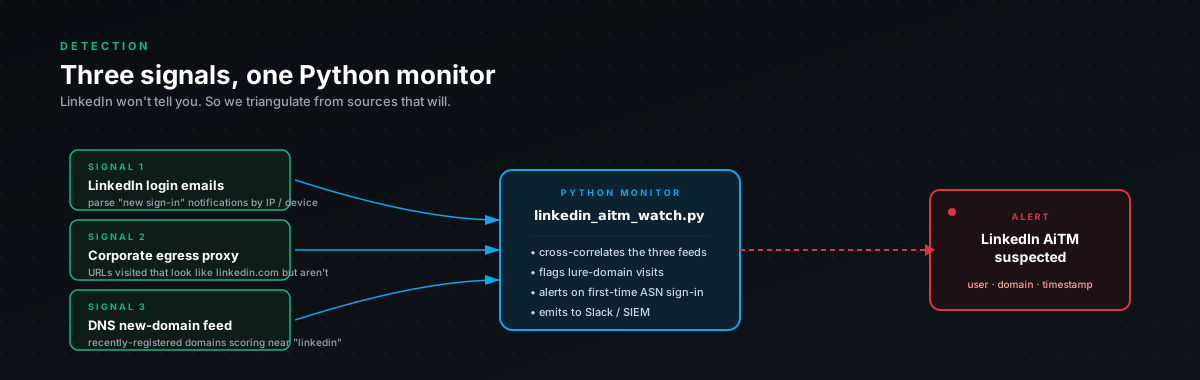
Three signals, in order of fidelity:
- Credentials POSTed to a non-LinkedIn domain. Highest fidelity. If your gateway sees a POST to
/checkpoint/lg/login-submitgoing somewhere that is notlinkedin.com, that is the AiTM proxy. Not a probable indicator, the actual signature. li_atcookie reused across two different ASNs in a short window. Classic session replay. The legitimate user logs in from their home ISP, the attacker replays the captured cookie from a VPS, two ASNs show up against the same cookie value within minutes.- Impossible travel on the cookie. Same cookie used from two countries that are too far apart to traverse in the time elapsed. Slower-firing than #2 but easier to operationalize because you do not need to track cookie values, you can do it on user × IP × time.
For organizations without CASB, the Python monitor at the end of this post analyses LinkedIn's own login-history export and flags the same patterns offline. Useful for individual users, exec protection programs, and anyone without enterprise log infrastructure.
Detection 1. Credentials submitted to a non-LinkedIn domain
This is the cleanest detection because the signature is unambiguous. If your web proxy or SSL-inspecting gateway logs the POST destination, you can write the rule directly.
| --------------------------------------------------------------------chr(10)| DETECTION: LinkedIn credentials submitted to non-LinkedIn domainchr(10)| --------------------------------------------------------------------chr(10)| Source: Web proxy / SSL-inspecting gateway logschr(10)| What it catches:chr(10)| A POST to the LinkedIn login endpoint but the HTTP Host (orchr(10)| destination domain in the proxy log) is NOT linkedin.com.chr(10)| This directly identifies the AiTM proxy domain.chr(10)|chr(10)| Requires: SSL inspection enabled on gateway. Without it, proxy logschr(10)| show CONNECT to the attacker's domain but not the path. With SSLchr(10)| inspection, the path is visible.chr(10)| --------------------------------------------------------------------chr(10)chr(10)index=proxy sourcetype=*chr(10)http_method=POSTchr(10)chr(10)| wherechr(10)match(uri_path, "\/checkpoint\/lg\/login-submit") ANDchr(10)NOT match(dest_domain, "(?i)linkedin\.com$")chr(10)chr(10)| eval suspicious_domain = dest_domainchr(10)chr(10)| statschr(10)count,chr(10)values(src_ip) as src_ips,chr(10)values(suspicious_domain) as phishing_domains,chr(10)values(user) as users,chr(10)earliest(_time) as first_seen,chr(10)latest(_time) as last_seenchr(10)by suspicious_domainchr(10)chr(10)| table suspicious_domain, users, src_ips, count, first_seen, last_seenchr(10)chr(10)| sort -countVariant, subresource fetches to lookalike CDN domains
The phishlet rewrites LinkedIn CDN hostnames to subdomains of the attacker's domain. static.licdn.com becomes something like static-licdn.attacker.com. These subresource requests appear in your proxy logs alongside the main page load.
index=proxy sourcetype=*chr(10)chr(10)| wherechr(10)match(dest_domain, "(?i)static-licdn\.") ANDchr(10)NOT match(dest_domain, "(?i)static-licdn\.linkedin\.com|static\.licdn\.com")chr(10)chr(10)| statschr(10)count,chr(10)values(src_ip) as src_ips,chr(10)values(dest_domain) as lookalike_cdn_domainschr(10)by dest_domainchr(10)chr(10)| where count > 2chr(10)chr(10)| table dest_domain, lookalike_cdn_domains, src_ips, countThe count > 2 filter cuts noise, a single accidental request to a similarly-named domain does not constitute an attack signature, but a page load that pulls in 8-12 subresources from a lookalike CDN almost always is one.
What this misses
If your gateway does not do SSL inspection, this detection does not work, you only see CONNECT events to the attacker's domain, not the POST path inside the encrypted tunnel. CASB products that integrate at the application layer (Defender for Cloud Apps, Netskope, Zscaler) get visibility a different way; check whether your CASB exposes the path field for LinkedIn-classified traffic.
Detection 2, li_at replayed from a new ASN
The session-replay detection. Same cookie value, two different ASNs, short time window. This requires your CASB or proxy to log the actual li_at cookie value (or a hash of it) so you can correlate.
| --------------------------------------------------------------------chr(10)| DETECTION: LinkedIn li_at session replayed from new ASNchr(10)| --------------------------------------------------------------------chr(10)| Source: CASB or web proxy logs (Zscaler, Netskope, MCAS, Squid)chr(10)| What it catches:chr(10)| li_at cookie SET at login from ASN-A, then the same cookie valuechr(10)| SENT in subsequent requests from a different ASN, classic sessionchr(10)| replay after AiTM capture.chr(10)| Tune: adjust time window (4h default) and ASN thresholdchr(10)| --------------------------------------------------------------------chr(10)chr(10)index=proxy OR index=casb sourcetype=*chr(10)host=*linkedin.com* OR dest_domain=*linkedin.com*chr(10)chr(10)| eval li_at_value = coalesce(chr(10)'http.response.set_cookie.value',chr(10)'cookie.li_at',chr(10)'set_cookie_li_at'chr(10))chr(10)chr(10)| where isnotnull(li_at_value) AND li_at_value != ""chr(10)chr(10)| eval event_type = if(chr(10)match(_raw, "Set-Cookie.*li_at"),chr(10)"cookie_issued",chr(10)"cookie_used"chr(10))chr(10)chr(10)| statschr(10)earliest(_time) as first_seen,chr(10)latest(_time) as last_seen,chr(10)values(src_ip) as all_src_ips,chr(10)values(src_asn) as all_asns,chr(10)count as request_countchr(10)by li_at_value, userchr(10)chr(10)| eval asn_count = mvcount(all_asns)chr(10)chr(10)| where asn_count > 1chr(10)chr(10)| eval time_window_hours = round((last_seen - first_seen) / 3600, 1)chr(10)chr(10)| where time_window_hours < 4chr(10)chr(10)| eval alert_reason = "li_at used from " . asn_count . " ASNs within " . time_window_hours . "h"chr(10)chr(10)| table user, li_at_value, all_src_ips, all_asns, request_count, time_window_hours, alert_reasonchr(10)chr(10)| sort -time_window_hoursFalse positives we keep hitting
Same kind of false-positive list as the M365 detection. Honest list because alert fatigue is what kills these.
Mobile users on cellular ↔ wifi switching. Phone moves between LTE and home wifi, ASN changes, same li_at shows up under both. The 4-hour window helps but does not eliminate this. We exclude users on watchlists for "field" / "sales" / "travel" titles when the ASN change is between two consumer ISPs in the same country.
Corporate VPN connect/disconnect. If users have a corporate VPN and toggle it during a LinkedIn session, you will see li_at from the VPN egress ASN and from their home ISP ASN within minutes. Maintain a known_corp_egress list and filter both ASNs.
LinkedIn mobile app + browser. Some users have LinkedIn open in both a browser and the mobile app simultaneously. Different ASNs (residential ISP vs. cell carrier), same logical session. We do not currently exclude this, the actual cookie values differ between the two clients in our testing. But verify against your own data before assuming.
The case that is almost never a false positive: the second ASN belongs to a hosting provider (DigitalOcean, Hetzner, OVH, AWS, Cloudflare). Real users do not have LinkedIn sessions originating from a VPS. When you see this, treat as confirmed compromise until proven otherwise.
Detection 3. Impossible travel on the cookie
This is the slower-firing but easier-to-operationalize variant. You do not need to track cookie values, just user, IP, time, and geolocation.
| --------------------------------------------------------------------chr(10)| DETECTION: LinkedIn impossible travel, login vs usechr(10)| --------------------------------------------------------------------chr(10)| Source: CASB or proxy + DNS logs where LinkedIn auth is visiblechr(10)| What it catches:chr(10)| A login event from country/city A, then immediately followed bychr(10)| API or page-load activity from country/city B, impossible underchr(10)| normal conditions.chr(10)| Requires: GeoIP enrichment on src_ipchr(10)| --------------------------------------------------------------------chr(10)chr(10)index=casb OR index=proxy sourcetype=*chr(10)dest_domain=*linkedin.com*chr(10)chr(10)| iplocation src_ipchr(10)chr(10)| eval event_class = case(chr(10)match(_raw, "Set-Cookie.*li_at"), "login_cookie_issued",chr(10)match(uri_path, "\/feed|\/mynetwork|\/in\/"), "post_login_access",chr(10)1==1, "other"chr(10))chr(10)chr(10)| where event_class != "other"chr(10)chr(10)| statschr(10)earliest(_time) as event_time,chr(10)values(Country) as countries,chr(10)values(City) as cities,chr(10)values(src_ip) as ips,chr(10)values(event_class) as event_typeschr(10)by user, li_at_cookie_valuechr(10)chr(10)| eval country_count = mvcount(countries)chr(10)| eval time_span_min = round((max(event_time) - min(event_time)) / 60, 1)chr(10)chr(10)| where country_count > 1 OR (country_count == 1 AND time_span_min < 10)chr(10)chr(10)| eval alert = case(chr(10)country_count > 1, "IMPOSSIBLE_TRAVEL: " . mvjoin(countries, " -> "),chr(10)time_span_min < 2, "RAPID_MULTI_CITY: login and access within " . time_span_min . "min",chr(10)1==1, "ANOMALOUS_SESSION"chr(10))chr(10)chr(10)| table user, alert, countries, cities, ips, time_span_min, event_typeschr(10)chr(10)| sort -time_span_minThis one fires on the cleanest case, login from one country, post-login activity from another, within a window short enough that a plane ride could not have happened. Most CASB products have a built-in "impossible travel" detector that does roughly this; the value of writing it explicitly is being able to scope it to LinkedIn (not noisy general-purpose) and tune the time threshold to your environment.
The Python monitor
For users and small teams without CASB, here is a standalone Python tool that analyses LinkedIn's own login-history export. LinkedIn lets any user download their account activity from linkedin.com/psettings/privacy, that export includes timestamps, IPs, and user agents for every login. The script below ingests that JSON and flags the same patterns as the SPL queries.
#!/usr/bin/env python3chr(10)"""chr(10)LinkedIn AiTM Session Monitorchr(10)-------------------------------chr(10)Detects anomalous LinkedIn session activity consistent with li_atchr(10)cookie theft and replay. Reads browser cookie exports, proxy logs,chr(10)or LinkedIn's own login history page.chr(10)chr(10)Usage:chr(10)# Analyse a Netscape-format cookie export from your browser:chr(10)python linkedin_session_monitor.py --cookies cookies.txtchr(10)chr(10)# Analyse LinkedIn's recent activity JSON (privacy download):chr(10)python linkedin_session_monitor.py --login-history login_history.jsonchr(10)"""chr(10)chr(10)import jsonchr(10)import timechr(10)import socketchr(10)import argparsechr(10)import datetimechr(10)import http.cookiejarchr(10)from dataclasses import dataclass, fieldchr(10)chr(10)chr(10)# Known datacenter / hosting ASN prefixes.chr(10)DATACENTER_ASNS = {chr(10)"AS20473": "Choopa/Vultr",chr(10)"AS9009": "M247",chr(10)"AS62874": "Limestone Networks",chr(10)"AS36352": "ColoCrossing",chr(10)"AS59253": "Leaseweb",chr(10)"AS16276": "OVH",chr(10)"AS14061": "DigitalOcean",chr(10)"AS16509": "Amazon AWS",chr(10)"AS15169": "Google Cloud",chr(10)"AS8075": "Microsoft Azure",chr(10)"AS24940": "Hetzner",chr(10)"AS13335": "Cloudflare",chr(10)}chr(10)chr(10)LI_AT_MAX_AGE_DAYS = 14chr(10)REPLAY_WINDOW_MINUTES = 60chr(10)chr(10)chr(10)@dataclasschr(10)class LoginEvent:chr(10)timestamp: datetime.datetimechr(10)ip: strchr(10)asn: str = ""chr(10)asn_name: str = ""chr(10)country: str = ""chr(10)is_datacenter: bool = Falsechr(10)chr(10)chr(10)@dataclasschr(10)class SessionReport:chr(10)alerts: list = field(default_factory=list)chr(10)chr(10)def add(self, severity, message):chr(10)self.alerts.append((severity, message))chr(10)print(f"[{severity}] {message}")chr(10)chr(10)chr(10)def asn_lookup(ip: str):chr(10)"""Team Cymru WHOIS lookup."""chr(10)try:chr(10)sock = socket.socket(socket.AF_INET, socket.SOCK_STREAM)chr(10)sock.settimeout(5)chr(10)sock.connect(("whois.cymru.com", 43))chr(10)sock.send(f"begin\nverbose\n{ip}\nend\n".encode())chr(10)response = b""chr(10)while True:chr(10)chunk = sock.recv(4096)chr(10)if not chunk:chr(10)breakchr(10)response += chunkchr(10)sock.close()chr(10)for line in response.decode(errors="replace").strip().splitlines():chr(10)if "|" in line and not line.startswith("AS"):chr(10)parts = [p.strip() for p in line.split("|")]chr(10)if len(parts) >= 3:chr(10)return "AS" + parts[0], parts[2]chr(10)except Exception:chr(10)passchr(10)return "UNKNOWN", "UNKNOWN"chr(10)chr(10)chr(10)def parse_login_history(path):chr(10)events = []chr(10)with open(path) as f:chr(10)data = json.load(f)chr(10)for entry in data:chr(10)ts = datetime.datetime.fromtimestamp(entry.get("timestamp", 0))chr(10)ip = entry.get("ip", "0.0.0.0")chr(10)asn, asn_name = asn_lookup(ip)chr(10)events.append(LoginEvent(chr(10)timestamp=ts, ip=ip, asn=asn, asn_name=asn_name,chr(10)is_datacenter=asn in DATACENTER_ASNS,chr(10)))chr(10)return sorted(events, key=lambda e: e.timestamp)chr(10)chr(10)chr(10)def analyse(events, report):chr(10)for ev in events:chr(10)if ev.is_datacenter:chr(10)provider = DATACENTER_ASNS.get(ev.asn, "Unknown")chr(10)report.add(chr(10)"HIGH",chr(10)f"Login from datacenter ASN {ev.asn} ({provider}) at "chr(10)f"{ev.timestamp} from IP {ev.ip}. AiTM proxies run on "chr(10)f"cloud VPSes, strong indicator."chr(10))chr(10)chr(10)for i in range(1, len(events)):chr(10)prev, curr = events[i - 1], events[i]chr(10)delta_min = (curr.timestamp - prev.timestamp).total_seconds() / 60chr(10)if prev.asn != curr.asn and delta_min < REPLAY_WINDOW_MINUTES:chr(10)report.add(chr(10)"HIGH",chr(10)f"ASN changed {prev.asn} -> {curr.asn} within {delta_min:.1f} min "chr(10)f"({prev.ip} -> {curr.ip}). Consistent with replay after AiTM capture."chr(10))chr(10)chr(10)chr(10)if __name__ == "__main__":chr(10)parser = argparse.ArgumentParser()chr(10)parser.add_argument("--login-history", required=True)chr(10)args = parser.parse_args()chr(10)chr(10)report = SessionReport()chr(10)events = parse_login_history(args.login_history)chr(10)analyse(events, report)chr(10)chr(10)if not report.alerts:chr(10)print("[CLEAN] No anomalies detected.")chr(10)else:chr(10)print("\n--- If HIGH alerts present ---")chr(10)print(" 1. linkedin.com/psettings/sign-in-and-security -> 'Sign out of all'")chr(10)print(" 2. Change LinkedIn password")chr(10)print(" 3. Review OAuth apps and recent messages")chr(10)print(" 4. Enable passkey (FIDO2)")The full version of this script (with cookie-file parsing, multiple input formats, and tunable thresholds) is in the research bundle. Drop it into a cron job for high-value users and you have a $0 detection layer that complements your CASB.
Tuning recommendations
We run these at MEDIUM by default and escalate to HIGH if any of:
- The second ASN is a known hosting provider (matches the
DATACENTER_ASNSlist above) - The user has a high-value role (executive, recruiter, finance lead, anyone with public-facing communications authority)
- The detection co-fires with an authentication anomaly on the user's other accounts (M365, Google Workspace, etc.), cross-platform compromise often correlates
Recommended response
When detection 2 or 3 fires for a non-VIP user with no other indicators:
- Verify with user out-of-band (call them, do not message)
- Walk them through
linkedin.com/psettings/sign-in-and-security-> "Sign out of all sessions" - Have them change password and review recent activity
- Move on
When detection 1 fires (POST to non-LinkedIn domain), or any detection fires for a high-value user:
- Treat as confirmed until proven otherwise
- Have the user revoke immediately, do not wait
- Reset password and any additional MFA methods registered in last 24h
- Audit OAuth apps, recent connections, recent InMail messages
- Pivot-hunt the source IP across other users' LinkedIn traffic
- Notify any contacts the attacker may have messaged
The runbook in this bundle has the complete sequence with timing expectations.