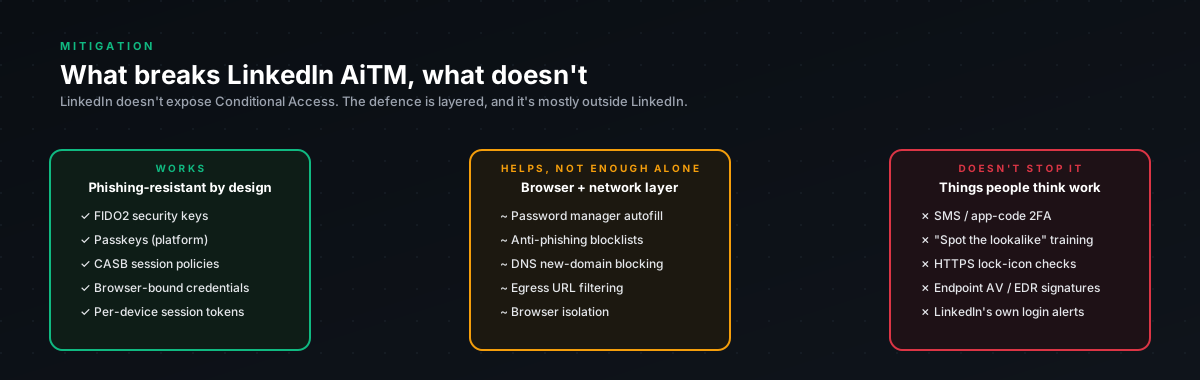
The priority order
There are five controls worth considering. Only one of them actually breaks the attack, the rest narrow blast radius or shift the failure mode. Here is the order we recommend, with what each control does and where it falls short.
- FIDO2 / passkey. Breaks the attack completely. Cost is low, passkeys are free, hardware keys around $30. Effort is minutes per user.
- LinkedIn SSO via corporate IdP. Mostly breaks the attack, depending on the IdP's MFA configuration. Requires LinkedIn Enterprise. Effort is moderate. IdP config plus user migration.
- CASB with LinkedIn context-aware policy. Detects and blocks session replay. Costs CASB licensing. Effort is policy authoring and tuning.
- Password manager with origin binding. Blocks autofill on the proxy domain. Low cost, low effort.
- Security awareness training. Friction only, does not break the attack. Low cost, moderate effort to run as a program.
The order matters. FIDO2 is not optional for high-value users. Everything else is depth behind FIDO2.
Control 1. FIDO2 / passkey
This is the one that actually breaks AiTM. Here is why it is structural rather than probabilistic.
WebAuthn (the standard behind FIDO2 and passkeys) binds authentication to the exact origin the credential was registered on. When the user clicks "Sign in" on the phishing page, the browser asks the authenticator to sign a challenge that includes the relying-party ID, linkedin.com. The browser checks the relying-party ID against the current page origin, sees that the page is at routiqs.com, and refuses to invoke the authenticator. The authentication does not complete. The attacker captures nothing, no credentials, no session cookies, no fingerprint data.
The user does not have to notice anything. The auth flow simply does not work on the attacker's domain. The failure mode is "the page doesn't sign me in" rather than "I typed my password into the wrong site." That is a structurally safer failure mode.
How to enable on LinkedIn
For an individual user:
- Sign into LinkedIn from a known-good device on
linkedin.comdirectly (not a clicked link) - Go to Settings & Privacy → Sign in & security → Two-step verification
- Click Add a phone or device
- Choose Passkey (requires hardware key, Touch ID, Face ID, or Windows Hello)
- Complete registration. Your device's biometric or hardware key is now bound to
linkedin.com
After registration, on every subsequent login LinkedIn prompts for the passkey. On the legitimate domain, the passkey works. On any phishing domain, it does not.
For organizations on LinkedIn Enterprise products
If you have LinkedIn Recruiter, LinkedIn Learning, or LinkedIn Marketing Solutions, you have access to SAML 2.0 or OIDC SSO through LinkedIn's identity integration. Configure your IdP (Okta, Entra ID, PingFederate, Auth0) to be the identity authority and enforce phishing-resistant MFA at the IdP layer.
This is the cleanest setup: the user never types LinkedIn credentials directly. They click "Sign in with [your IdP]," get redirected to the IdP, authenticate there with FIDO2 (or whatever your IdP enforces), and get a SAML assertion. LinkedIn never sees a password. The attacker's proxy would need to intercept and proxy your IdP simultaneously, possible in theory but operationally much harder, and triggers detections on the IdP side.
Where FIDO2 falls short
It does not protect users who have not yet enrolled. The rollout window is the vulnerability window. Roll out fast for high-value users, slow for everyone else.
It does not protect against social-engineering paths that do not go through authentication, e.g. an attacker contacting LinkedIn support claiming to be the user. That path requires LinkedIn-side controls that are not in your hands.
It does not invalidate existing sessions when enabled. A user who got AiTM'd last week and then enabled FIDO2 today still has the captured li_at floating around. Pair the FIDO2 enrollment with a "Sign out of all sessions" click.
Control 2. LinkedIn SSO via corporate IdP
For organizations on LinkedIn Enterprise products. Routes LinkedIn authentication through your IdP (Okta, Entra ID, etc.). Users click "Sign in with [Company]" rather than typing LinkedIn credentials.
Why this helps:
- The attacker's proxy would need to proxy both LinkedIn AND your IdP simultaneously
- Your IdP can enforce device compliance, geo-restrictions, FIDO2-only authentication
- Even if the attacker captures the LinkedIn session cookie via a different vector, your IdP can revoke by terminating the SSO session
- Centralizes detection on the IdP. LinkedIn auth events show up alongside all other SaaS auth in your logs
Caveats:
- Requires LinkedIn Enterprise, not available for individual accounts
- Migration is a multi-week project, with user-side friction during the transition
- Only protects accounts associated with the corporate IdP, personal LinkedIn accounts of employees remain on direct credentials
This is the right setup for organizations where LinkedIn is mission-critical (recruiting, sales, marketing, exec presence). Combined with FIDO2 at the IdP layer, it is the strongest configuration available.
Control 3. CASB with LinkedIn context-aware policy
A Cloud Access Security Broker that classifies LinkedIn traffic and applies policy. Useful when you have CASB already deployed for other SaaS, incremental cost is policy authoring, not new licensing.
CASB products with LinkedIn context support:
- Microsoft Defender for Cloud Apps. LinkedIn connector available
- Netskope. LinkedIn classified as a social-media cloud app
- Zscaler Internet Access, supports URL category and DLP on LinkedIn
Sample policy logic:
IFchr(10)user.session.location_change ANDchr(10)time_since_last_auth < 60min ANDchr(10)new_location.asn IN [datacenter_asn_list]chr(10)THENchr(10)block AND require_reauthenticationThe datacenter_asn_list should include cloud VPS providers. DigitalOcean, Hetzner, OVH, Vultr, AWS, Azure, Cloudflare. The detection bundle in this section has the same list with ASN numbers.
What CASB catches that detections do not:
- Real-time enforcement, not after-the-fact alerting. The session gets blocked at the proxy before the attacker can use the cookie.
- Multi-account correlation. CASB can flag a single attacker IP hitting multiple users' LinkedIn sessions.
- Inline DLP. Block sensitive data exports through LinkedIn InMail or downloads.
Where CASB falls short:
- Requires SSL inspection, which raises privacy and reliability concerns
- Personal LinkedIn accounts on personal devices route around CASB unless devices are managed
- Tuning false positives is ongoing work, mobile users, VPN switching, residential ISP changes all trigger naive policies
Control 4. Password manager with origin binding
Password managers that enforce domain-matching (1Password, Bitwarden, Dashlane, KeePassXC) refuse to autofill credentials on routiqs.com because the saved entry is bound to linkedin.com. The user clicks the password manager icon, gets nothing, and either notices the URL or types manually.
This is friction, not prevention. Many users will type credentials manually if autofill does not work, they assume the password manager is broken rather than that the page is a phishing site. But for security-aware users, the missing autofill is the warning signal that catches the attack.
Enterprise enforcement is achievable through MDM / corporate password vaults, push 1Password or Bitwarden as the standard, disable browser-stored passwords, audit usage. Low cost, low effort, modest payoff.
Control 5. Security awareness
Train users to inspect the URL bar before entering credentials on any login page. The phishing page is a pixel-perfect copy of LinkedIn except for the URL. Users who check the URL catch the attack. Users who do not, do not.
What to teach:
- LinkedIn login is always at
www.linkedin.com. If the URL says anything else, do not type credentials. - A pixel-perfect copy of the login page on a different domain is the attack. The visual appearance means nothing.
- If you clicked a link and ended up on a login page, close the tab and navigate to
linkedin.comdirectly via a bookmark. - Password manager autofill failure is a warning sign, not a bug.
High-priority training audiences:
- Executives, high-value targets, often less technical, often clicking links from assistants
- HR / Talent Acquisition, extensive LinkedIn use, frequent clicks on candidate profiles, prime BEC pretexts
- Sales / Business Development. Premium accounts, frequent logins, valuable network
- Anyone with access to LinkedIn Recruiter, Marketing Solutions, or company-page admin
Effectiveness on its own: low. Training does not scale to every user, fatigues with repetition, and asks users to win against pixel-perfect impersonation. Use as the bottom layer behind FIDO2 and CASB.
What does not work
Some controls people assume help, that actually do not:
SMS-based 2FA. AiTM walks right through SMS 2FA. The proxy captures the SMS code along with everything else. SMS 2FA is better than nothing, but it does not break this attack.
TOTP authenticator apps. Same problem. The TOTP code gets typed on the phishing page, captured by the proxy, replayed to LinkedIn. The proxy is invisible to TOTP.
Push-notification 2FA. The user gets a push, approves it because they really are logging in (from their perspective), and authentication completes. The attacker has the cookie. Push 2FA only helps if the user notices something off and rejects the push, which is unreliable.
reCAPTCHA challenges from LinkedIn. As covered in the threat model, 2captcha defeats this for ~$0.003 per account. It raises the cost slightly. It does not break the attack.
Email gateway URL rewriting. Helpful for known-bad domains. Does not help for fresh domains the attacker registered yesterday on Cloudflare.
The reason FIDO2 works where these others fail is that FIDO2 is the only one where the authenticator does not transmit anything that can be captured and replayed. Everything else (codes, pushes, passwords) can be captured. FIDO2 produces a signature bound to the origin; the signature is useless on the wrong origin even if captured.
The rollout sequence we recommend
For an organization starting from zero:
Week 1. Identify high-value users, executives, recruiters, sales leadership, finance leads, anyone whose LinkedIn account would be expensive to compromise. Typically 50-200 people in a mid-size company.
Week 2-3. Roll out FIDO2 to that group. Provide hardware keys for users who do not have biometric devices. Run a 30-minute office-hours session to walk users through the registration. The actual enrollment takes 2 minutes per user.
Week 4. Pair the FIDO2 enrollment with "Sign out of all sessions", invalidates any cookies the user may have already had stolen pre-rollout.
Week 5-8. CASB policy authoring. Deploy detection-only first, then escalate to enforcement after a tuning period.
Ongoing. Roll out FIDO2 to broader user base. Aim for 100% coverage within a quarter. Pair with security awareness training as a bottom layer.
This is the sequence that gets the highest-risk accounts protected fastest, with the lowest organizational disruption.
Where each control fails
Honest summary because every control has a failure mode:
- FIDO2 fails for users who have not enrolled. Mitigation: enroll fast.
- SSO via IdP fails if the IdP itself gets phished. Mitigation: phishing-resistant MFA at the IdP.
- CASB fails on personal devices outside management. Mitigation: device compliance enforcement for sensitive resources.
- Password manager fails when users type manually. Mitigation: training + autofill-failure-is-a-warning education.
- Awareness fails when users are tired, distracted, or under social pressure. Mitigation: do not rely on it as primary defense.
The combination of FIDO2 + CASB covers the realistic threat surface for ~95% of users. Layering password manager + SSO closes most of the rest. Awareness is the safety net for the long tail.
Final word
If you only do one thing: roll out FIDO2 / passkeys for users whose LinkedIn account would be valuable to compromise. That single change takes the attack from "trivial with a $5 VPS and a Cloudflare domain" to "structurally impossible against the FIDO2-protected accounts." The cost of the change is low. The cost of skipping it is the cost of an exec account compromise plus the BEC and phishing pivots that follow.