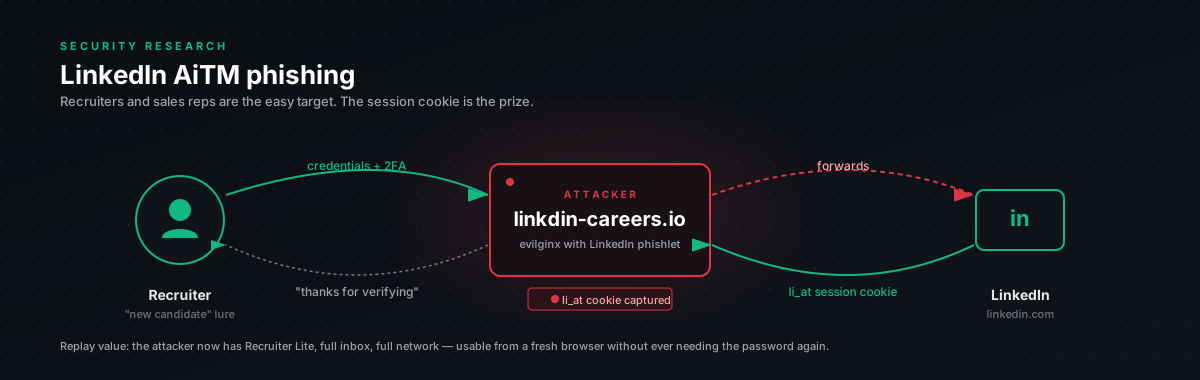
The whole attack in one paragraph
Attacker registers a lookalike domain. Stands up an evilginx-style proxy in front of LinkedIn. Sends a victim a link, usually pretexted as a connection request, a shared document, or a job opportunity. Victim clicks, lands on what looks like the LinkedIn login page on the attacker's domain. Types email and password. The proxy reads both in plaintext on the way through and forwards the form to the real LinkedIn. LinkedIn responds normally, sometimes with a reCAPTCHA challenge, sometimes straight through. If the challenge passes, LinkedIn issues li_at and JSESSIONID cookies. The proxy reads them on the response and pipes them to the attacker. The attacker pastes li_at into their own browser and is logged in as the victim. No password needed. No MFA prompt. Session lasts for weeks.
That is the attack. It is the same shape as the M365 one but with worse defaults. LinkedIn's MFA story is thinner than Microsoft's, FIDO2 support is recent and underused, and most users do not have any organizational policy enforced on their LinkedIn account at all.
What gets captured at each step
We tested this in our lab against a controlled burner account and confirmed exactly what comes off the wire at each stage. Useful for defenders to know what is and is not lost when the attack succeeds at different depths.
- Victim clicks lure. Proxy gets URL fingerprint, referrer, IP. Just visit metadata, nothing dangerous yet.
- Login page renders. Proxy captures nothing, the page is just a transparent proxy of
linkedin.com/login. The lookalike domain is in the URL bar, but the visual is identical. - Victim submits credentials. Proxy captures
session_key(the email),session_password,csrfToken,loginCsrfParam, and the device fingerprint blob (apfc,fp_data). Plaintext password. This alone is enough to enable password-reuse attacks against the user's other services. - Pre-auth response. Proxy captures
bcookie,bscookie,lidc,JSESSIONID,__cf_bm,li_rm. These cookies alone do not grant session access.li_rmis just a refresh hint, not a session token. - reCAPTCHA challenge (if triggered). Proxy sees the iframe URL, sitekey, and action name. The challenge endpoint is
/checkpoint/challenge/captchaInternal. Naive AiTM kits stop here. - Captcha solved (manually or via 2captcha). Token returned to LinkedIn. Cost via 2captcha: about $3 per 1000 solves.
- Post-auth response. Proxy captures
li_atandliap. This is the prize.li_atalone is a full session cookie, replayable for weeks.
The thing to internalize: the password capture happens before any challenge. Even if reCAPTCHA blocks the attacker from getting li_at, they already have the password in plaintext. If the user reuses that password on Gmail, their bank, or anywhere else, those accounts are now compromised regardless of what LinkedIn's security team does.
Why li_at is the prize
LinkedIn's session model is heavier on li_at than M365's session model is on any single cookie. M365 has ESTSAUTH, ESTSAUTHPERSISTENT, SignInStateCookie, claims, optional Token Protection binding, and CAE that can revoke in seconds. LinkedIn has li_at and a fairly long lifetime, with revocation that depends on the user explicitly clicking "Sign out of all sessions." Most users never do that.
Concrete consequences:
- A captured
li_atlasts weeks unless the user manually revokes - It survives password reset (LinkedIn does not invalidate session cookies on password change)
- Replay does not trigger MFA, once you have the cookie, you bypass authentication entirely
- It works from any browser on any IP, there is no device-binding equivalent to Token Protection
Compared to M365, this is a softer target. The mitigation surface is narrower because LinkedIn does not give you Conditional Access, does not give you device compliance enforcement for personal accounts, and does not natively integrate with most CASBs the way Microsoft does. The defense story leans heavily on FIDO2 (which works) and detection on the network egress side (which is harder).
Mapped to ATT&CK
- Resource development (T1583.001), attacker registers a lookalike domain, fronts it with Cloudflare for cert and DDoS protection
- Initial access (T1566.002), phishing link delivered via email, LinkedIn InMail, or chat
- Credential capture (T1056.003), email and password caught in transit through the proxy
- Cookie theft (T1539),
li_atlifted from the response on successful login - Account access (T1078), cookies replayed from the attacker's machine
- Persistence (T1098), connected accounts modified, OAuth apps consented
- Collection (T1119), connection list and message history exported
- Lateral movement (T1534). InMail spear-phishing to victim's connections
- Impact (T1657), reputation damage, BEC pivots, social-engineering follow-ons
What breaks each step
The right way to think about defense is: which control kills which step? Some controls take entire stages off the board. Others only narrow the blast radius after compromise.
- Email reaches inbox. An email gateway with phishing-link sandboxing helps, but Cloudflare-fronted phishing domains bypass most reputation checks for the first few hours.
- Link is opened. Browser SmartScreen and Safe Browsing help against known-bad domains. Reputation lags by hours, sometimes days, so freshly-registered attacker domains sail through.
- Login page renders. Nothing useful at this layer. The page is LinkedIn, just proxied.
- Password is typed. FIDO2 / passkey is the strong control here. WebAuthn binds to origin. The proxy is at a different origin. The authenticator refuses to sign. The attack fails before any data leaves the browser.
- Credentials reach the proxy. A password manager with origin binding helps. The manager refuses to autofill on the wrong domain. Many users notice the missing autofill. Some type anyway.
- Cookies captured. LinkedIn SSO via a corporate IdP is strong here. The IdP handles authentication, LinkedIn never sees the password directly, and the attacker would need to proxy both LinkedIn and your IdP simultaneously.
- Cookies replayed. CASB with session-context policy is useful. New ASN or geography on
li_attriggers re-authentication. Detection-grade for individual accounts and enforceable for corporate-managed devices. - Persistence established. LinkedIn login history monitoring is detection-only. Tells you it happened. Does not prevent it.
If you take one thing from this table, take this: FIDO2 makes the attack fail at the credential entry step. Passkeys are now supported on LinkedIn natively. Roll them out for any user whose LinkedIn account would be valuable to compromise, executives, recruiters, sales leadership, anyone with a large or trusted network.
Why reCAPTCHA is not the protection people think it is
When testing in the lab we hit a phase where LinkedIn's risk engine started serving reCAPTCHA Enterprise v3 to our flagged burner. That looks, on first glance, like LinkedIn's defense holding the line. It is not.
What reCAPTCHA blocks:
- Naive AiTM kits that have not been customized to handle the captcha iframe
- Datacenter IPs with no login history
- Fresh accounts with no behavioral baseline
What reCAPTCHA does not block:
- Captcha-solving services. 2captcha is $3 per 1000 solves. We confirmed end-to-end that it works against LinkedIn's
captchaInternalendpoint. The bypass takes a small JavaScript shim that intercepts the script load, feeds the sitekey to the API, and returns the solved token back to LinkedIn's form. Total cost per compromised account: ~$0.003. - Residential-proxy infrastructure. If the attacker pays for a residential proxy in the victim's country, the risk score drops and the captcha does not trigger.
- Established attacker infrastructure. Older domains and IPs that have built up reputation pass cleanly.
The takeaway: do not count reCAPTCHA as a control. It is a friction layer that costs an attacker about $3 to defeat. The real protection is FIDO2, which raises the cost from "trivially defeatable" to "structurally impossible."
What attackers actually do once they have li_at
In our research engagement we did not pivot beyond verifying we had the cookie, but the post-compromise playbook is well-documented from real incidents:
InMail phishing to the victim's network. A captured exec account is a high-trust source. Phishing links sent via InMail get clicked at far higher rates than cold email. The attacker uses the captured account to spear-phish people in the victim's company.
Connection scraping for downstream targeting. Export the victim's first-degree connections. This is the input to a directed phishing campaign against the victim's company, customers, or vendors.
Profile modification. Change the victim's contact info, profile description, or pinned post. Subtle changes go unnoticed for days. Hostile changes (fake job announcement, fake product endorsement, redirect to attacker-controlled domain) can do real reputational damage before the victim notices.
Job application spam from the victim's account. Sometimes used as cover or distraction. Sometimes used to gather employer intelligence, the application response from a target company reveals hiring contacts.
OAuth app consent. LinkedIn supports OAuth integrations. The attacker can grant a malicious app access to the account, which persists even after the user changes their password and revokes the session. This is the LinkedIn equivalent of the M365 OAuth-grant persistence pattern.
The risk is not just account loss. It is reputational damage and downstream phishing of people who trust the victim.
Threat actors using this
Public reporting on LinkedIn AiTM is thinner than M365 reporting, partly because compromise often does not get reported and partly because the BEC follow-ons usually get attributed to "phishing" without specifying the LinkedIn vector. From engagements we have seen and what is in public:
- BEC actor groups that have moved upstream into LinkedIn-first reconnaissance, then cookie capture for InMail follow-ons
- Recruiter-themed phishing campaigns that target specific industries (defense contractors, finance, fintech) and deliver LinkedIn AiTM lures pretexted as job opportunities
- Coordinated spear-phishing campaigns against journalist and researcher LinkedIn accounts, attributed (informally) to state-aligned groups
The toolchain is the same as M365 AiTM, evilginx forks with LinkedIn phishlets. Phishlet definitions are circulating semi-publicly. The tooling barrier is low.
Why detection alone is not enough
Same arithmetic as the M365 case. Detection fires. Routes through alerting. Someone triages. By the time the response happens (even in a well-run program) the attacker has had the account for at least 30 minutes. In that window:
- Connections scraped
- One or two InMails sent to high-value contacts
- Profile modified if part of the attacker's plan
- OAuth app consent granted (this survives password reset and session revoke)
For high-value users, the dwell-time math means detection is insurance, not defense. Roll out FIDO2 for users whose accounts would be expensive to compromise. Detection then catches the long tail, users who do not have FIDO2 yet, or users who manually typed credentials despite a passkey being available.
Up next in this bundle
- SPL queries plus a Python monitor for LinkedIn session anomalies, what to look for, what tunings work, false-positive patterns
- Conditional controls. FIDO2 rollout, CASB policies, password manager enforcement, what each control actually breaks
- Incident response runbook, what to do at minute one, minute fifteen, hour one, day two, and week one when a LinkedIn account compromise is suspected
Read the threat model first. Look at where you are weakest. Start there.